Monday, March 11, 2013

The Digital Divide and Using Inforgraphics as Asessment

Even though I feel the Digital Native vs. Digital Immigrant debate has been rehashed a million times, every semester I still have the discussion with my students. Primarily because it is new to them and also because the same misconceptions still come up. What I love is that Mark Prensky basically wrote about Digital Natives around the time that most of my students were born, yet 95% of them consider themselves "Digital Immigrants." It really is interest more than age. So after we get the Digital Native Debate out of the way I want them to really focus on the Digital Divide. This is what I feel is the heart of the technology divide in our country - the haves and the have nots. I also believe that education can be the great equalizer for this. I asked my students to read about the Digital Divide and we could have had another debate, or I could have had them write a paper or blog post about why it was important, but in an Intro to Education Technology class, my assessments need to practice what I preach. So to assess their understanding of the Digital Divide I had them create an Infographic to explain the issue.

Here was the set-up:

Digital Divide Infographic

infographicBased on this week's reading on the Digital Divide as well as the resources that have been gathered online (See our Diigo Group), you will create an infographic that would be used to explain the Digital Divide to a group of teachers. This could be something that you would post on your blog, or tweet to your followers to help your fellow teachers understand this issue.

There are several Infographic Web 2.0 tools available including:

Piktochart - http://piktochart.com/
Has great built in features to create charts and visuals to explain statistics

Has some nice templates to chose from for you to create an infographic

Very similar to Easelly and template based

Infogram - http://infogr.am/
Boasts interactive infographics

Guiding Questions

Your infographic does not need to address all of these questions, but that can be used to help guide the focus of your project

1) Who is/isn't connected?
2) What type of technology? Phones, laptops, etc
3) How are they connecting?
4) What attributes matter? (income, education, geography, etc.)
5) Who connects how to what?
6) How sophisticated is the usage?
7) How do we overcome the divide?

Basically you need to address:
What is the Divide?
Why does it matter?
What are some solutions to solve it?


My students produced some incredible Infographics. In particular, I want to highlight this one from Shannon (used with Permission).

I gave my students the opportunity to use any infographic tool that they wanted. However, most gravitated towards Piktochart and I would have to say that the best looking infographics tended to use that tool. There was a definite learning curve for the different tools and in future I would scaffold that a bit more. However, I having students create an Infographic was a great way for me to assess their content knowledge on the subject.

Monday, March 4, 2013

NCTIES this week!

I love conferences (I think that is obvious :) but I REALLY love my local NC conference on Technology in Education, NCTIES. It just feels like one big reunion where I get to be immersed in the awesomeness that is technology integration in NC!  It will be taking place in Downtown Raleigh near the end of the week and has the theme of Game On: Play to Learn (I have a feeling Lucas Gillespie may have had some influence on that). There will be some amazing speakers this year including Mark Prensky, David Warlick, and Richard Byrne.

This year I have the honor to present with a group of amazing people.

Running your own PD: Edcamp Style 
How do you get buy-in from faculty and staff for your professional development? How do you share the collective knowledge of your faculty with one another? Use the Edcamp model to flip traditional PD on it's head!
Strand:  Professional development

Bethany Smith, NC State University
Steven Anderson, Winston-Salem/Forsyth County Schools
Dorene Bates, Winston-Salem/Forsyth County Schools
Marlo Gaddis, Winston-Salem/Forsyth County Schools
Mark Samberg, Bertie County Schools

We will be presenting during Concurrent Session  6 on Thursday, March 7 which is from 3:40pm-4:30pm in Room 304.

I hope you will get the chance to drop by and see us!
 

Friday, March 1, 2013

To Prezi or not to Prezi

One of the biggest issues I run into with technology integration is the overabundant use of PowerPoint. Now my students know that PowerPoint is never an acceptable use of technology in my classroom (even with my PowerPoint Zen approach - I just don't go there anymore), but I find that many want to sneak a Prezi into their presentations. Now, to me a bad PowerPoint just makes a bad Prezi and I have issues with some of the "motion sickness" I get with a Prezi. So to be honest I just stopped using Prezi's for awhile. However, recently I gave two presentations that really lent themselves to the tool and they were better presentations because I used Prezi.

Millenials

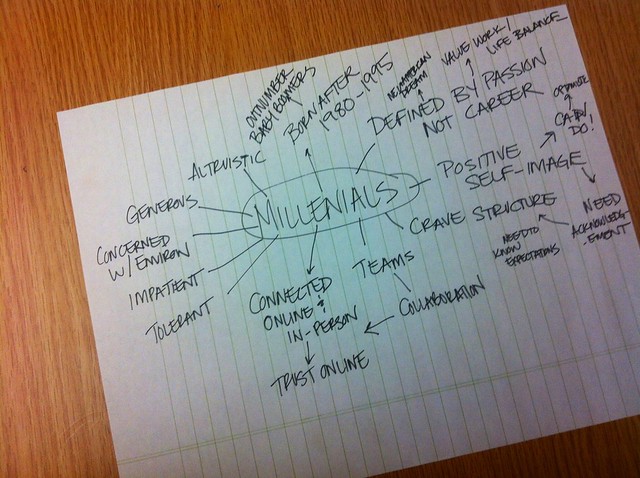
I gave a presentation on Millenials to a small group of graduate students at the Design School on campus. They wanted to know a bit about the characteristics an traits of the Millenial generation. I found that when I was doing research for this topic I used a basic Spiderweb brainstorming tool. (see photo).
I immediately realized that this looked like a Prezi and that having it in a Prezi format would really help my presentation.


NMC Horizon Report 2013

Every year the New Media Consortium publishes a report on current trends in Higher Education. They look at technological trends at universities across the globe and do a great job of providing an outlook of what to expect in coming years. Every year I present this report to a group of Higher Education graduate students and what technology they can expect to see when they graduate. In the past I have always used Prezi for these presentations because Prezi integrates with YouTube so well. However, this time I actually found a template that fit the idea of forecasting the future of technology, i.e. what is on the Horizon for the next few years.


All in all I'm happy that I gave Prezi another try, but I still feel that the technology has to to fit your goals for the presentation, not the other way around

BTW: To get a Prezi to embed in Blogger you need to look in your embed code and add an s after your http in ourder for it to embed correctly!

Friday, September 28, 2012

Digital Footprint

This week I asked my students to think about what their Digital Footprint is about online. They Google Searched themselves and used Skitch to illustrate what they found about themselves. They definitely had different opinions about how much information to post online. So I wanted to post my own search shots.

On my first search of just "Bethany Smith" only or two pages really applied to me.
Once I added "NC" to "Bethany Smith" almost all the webpages applied to me.
When I switched my search to the common username I use "bethanyvsmith" I found that all the web pages applied to me. But these are all things I want to be out there. There are no photos of my family or my personal Facebook use. If someone Googled me, I would be happy with what they found out about me.


Monday, August 20, 2012

Word Clouds

I started taking word clouds out of my Web 2.0 bag of tricks.  They just weren't very educational. Sure they were fun, but what do we actually learn from a word cloud? They are almost too easy. So I started coming across some really great ways to use word clouds in education.

Apparently I have underestimated the humble Word cloud.


So this semester I am using Word Clouds as a way to introduce ourselves in my online class. Trying to come up with key words that sum up your personality may be one of my favorite ways of using word clouds, plus it is much more interesting to read as a participant.  Every student is asked to create a word cloud and post to the discussion board (see previous post on my love/hate relationship with discussion boards).


Here is my Tagxedo Introduction Word Cloud


This allows me to introduce Word Clouds in a fun way, but also hint at some of the potential later on, without spending a good deal of time on them.

Sometimes just because it's simple, doesn't mean it's easy.


Wednesday, August 15, 2012

My Love/Hate Relationship with Discussion Boards

I love teaching online. I love taking classes online. I love meeting my colleagues and fellow students virtually online. BUT I hate discussion boards! Now not all discussion boards are created equal, but the majority of the discussion board posts I see look like this:
Read the assigned document for this week. Make one post about what you liked/disliked about this reading by Monday, post a response by Wednesday to another student's initial response.
The above to me does nothing but confirm (or try) to the instructor that the student read the article. It does not create community and ends up becoming busy work. So how do we improve discussion board posts? Well, I have a few ideas and suggestions:

Create Debate discussion boards:

In Moodle create a "Choice" activity where students can choose a side. Set-up areas for students on each side to construct their Opening statements (I used Google Docs, but a Wiki could work). Post opening statements to the discussion form, allow for a Q&A period for debate, and then have students work on a closing statement.
Why this works: Debates are great for getting students to see opposing viewpoints, or find evidence to back-up their own ideals. It creates a more dynamic discussion forum and you will (hopefully) never see the words "I agree"!

News & Announcements or Q&A forums:

Use forums as a way for students to ask questions about the class. This can be a great place to start an FAQ for the class. If a student asks you a question offline or in e-mail. Ask them to post it in the Q&A forum. Post all your Announcement in its own forum. In Moodle you can require students to subscribe, which will automatically email all of the students in your class. So when the email gets "lost" they can always go to one place to see changes.

Peer Review or sharing of student work:

One of the issues I have with online classes is that most work in the class is done between a student and an instructor. Discussion forums are one of the few places in a LMS that will allow for students to post files or links that can be shared with the rest of the class.

So traditional discussion forums are not all bad, and in most cases just need a great guided question, but I'll keep doing it just a bit differently!

There are lots of other ways to use discussion boards - how do you use them?

Thursday, April 26, 2012

Poem in Your Pocket

April is National Poetry Month, and in honor of this several events have popped up. There are some great projects you can do with your students and today happens to be Poem in Your Pocket day and in the spirit of this I would like to share with you a poem I found on http://celebratepoetry.tumblr.com/ a Tumblr where you can submit your own work.


Poem submission by E.K.Merrick

That ache for the sound of the rain on a tin roof,
to be held tight during a summer’s storm,
or lie awake in each other’s sweat on a
humid Sydney night.

Familiar voices, horizons like the scars on my hands
and that soothing lick of a language.
That ache to drive north on the Pacific, speeding away from
the harbour and lights. And for an hour,
there’s nothing,
nothing,
but the gums and the great expanse of the Hawkesbury.

And that ache to go back to those small coastal places
that define us more than we want to admit.
These places that we flee from, for fear that their rips
will drag us down and coerce us to stay in the sea,
a life lived as it always has been.

But it’s in these places to fall into the
arms of people loved forever,
despite our ever-shifting and contrasting landscapes.

And it’s these small coastal places that soothes this ache,
And it’s there to return home to, smiling.