Originally posted at http://thinkgate.com/iste-recap
This past week was the 34th International Society for Technology in Education Conference - ISTE (previously known at NECC) https://www.isteconference.org/2014 in Atlanta Georgia. There was a record number of attendees, over 14,000, yet ISTE still feels like a reunion for me. One of the best parts of going to a conference is the people you get to meet and connect with. I’ve been going to ISTE, off an on since 2006, and every time I go I see some of my old conference friends and make some new ones in the process. These are people I have connected with virtually, and maybe never met in person, but ISTE gives me a chance for us to have some important face-to-face discussions. One of the issues that many people have with technology is that they feel it is disconnecting us and making us less social. In fact, one of the presentations I attended at ISTE concerned dispelling myths such as these.(http://connectedprincipals.com/archives/10420) I think that technology such as Twitter and Facebook allows me to have deeper connections with people in my field and stay connected with them in-between the conferences. It makes the in-person connections just that much better.
Through these connections I get to see how other parts of the country, and world are dealing with some of the same issues and problems in my area. Although ISTE is a technology conference, and has an impressive vendor hall to attest to that, I find that some of the best sessions and exhibitors are really focused on educational objective first. In fact, one of the best sessions I went to had almost nothing to do with technology at all, but about collaboration. Matthew Kay, Diana Laufenberg and Marcie Hull gave some fantastic examples about collaboration in their classroom, but what struck me was how much their session was about showcasing how they facilitated good working relationships between their students, how they encouraged groups and collaboration in an environment that wasn’t necessarily centered around a group project. That you need to help students understand how to be part of an effective group. The technology supports these objectives and connects the students when outside of the classroom. It is easy to let the technology be the focus rather than letting your educational objectives drive your instruction.
I was lucky to present three times this ISTE, the most I have ever presented and although I felt our sessions went really well, I didn’t get the chance to go to as many sessions as I wanted to. The great thing about ISTE is that there really is something for everyone, from the newbies who are just starting to integrate technology to those that have been working with schools to go to 1:1 for over 20 years. Even though I couldn’t be everywhere, through tools like Twitter, I got to live through others experiences. I find that tweeting during sessions allows for me to take my own version of “notes” and using Twitter favorites enables me to save some of my favorite resources to use later. In fact, I have linked my Diigo bookmarks ( a fantastic online bookmarking tool) with my Twitter so that items I favorite on Twitter are automatically saved into my Diigo bookmarks. https://www.diigo.com/user/bethanyvsmith/ISTE2014
So yes, even though I attended some great sessions, the heart of this conference is getting to connect with my once online and now in-person friends. For me to see what they are doing in their classrooms and work and think about possible connections. Some of my friends don’t even go to sessions, they just hang out in the Blogger’s Cafe and have discussions the entire time. For me, I value what these discussions can bring and I like to attend sessions that expand my vision and idea of what technology integration can be. In the end, this may be a technology conference, but its the people I go to for.
Friday, July 11, 2014
Tuesday, August 6, 2013
QR Codes and Icebreakers
I am already a big QR Code fan, but I recently came across this post from Tony Vincent that
combined QR Codes with Cubes and Web 2.0 Reflection Tools. I can't wait to try it out in my class this fall. However, the opportunity arose for me to create something very similar this summer. I am working with our recent graduates from the college at the Beginning Teacher Institute and was placed in charge of the Icebreaker the first day. Now you either hate or love Icebreakers, but they can be helpful in getting the conversation flowing at a table. We knew as a team that we wanted to connect our recent graduates with other 1st and 2nd year teachers and share their experiences. We came up with two lists of Icebreaker Questions:
Current Teacher Icebreaker questions
What was the funniest thing that has every happened in your classroom?
What was your first parent/teacher conference like?
What one thing did you wish you had done differently on your first day of school?
What topic/activity are you most excited about teaching this year?
What are your extra duties like?
What does your dream classroom look like?
What was the most used supply in your classroom this year?
What internet resource do you use the most to get teaching ideas?
Who inspires you and how are you a bit like them?
Where do you see yourself in ten years?
First Year Teacher Icebreaker questions
What is your favorite “teacher” movie?
What was your favorite moment from student teaching?
If you had to pick a song as your own personal “theme song” what would it be?
Who was your favorite teacher as a student and why?
What excites you the most about the first day of school?
What were your best/worst subjects in school and what subjects would you want to learn now?
When you were in grade school, what did you want to be when you grew up? Why?
Name your favorite children's story.
Where do you see yourself in ten years?
Name 3 things you think will become obsolete in ten years.
What is the best or most interesting class you have ever taken in high school, college or graduate school?
Making QR Codes
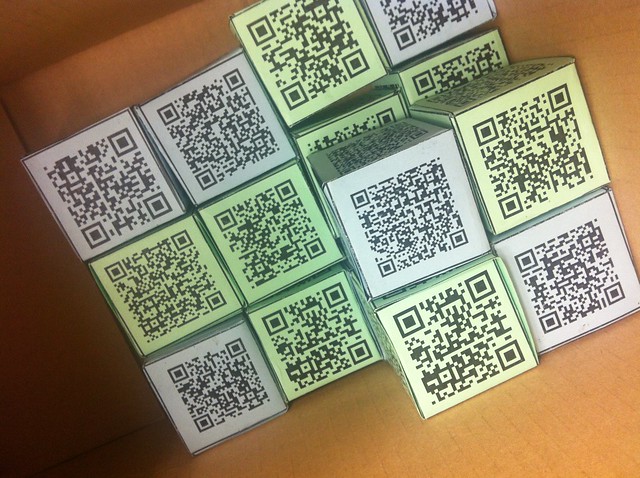
Now that I had the questions I wanted to make them into QR Codes. One of the nice things about QR Codes is that they don't have to be just web URLs, they can be text or numbers or geo locations. I used http://qrcode.kaywa.com/ to generate my "static" qr codes. I then used a basic cube template and added my qr codes to each of the sides. I printed them on different colors for each set, and voila my icebreaker was born!
Why QR Codes
The advantage of using QR Codes in this instance is that a person doesn't know which question they are going to be asked, it is truly at random. QR codes are great for self-check or anytime you need to conceal an element of an activity. I brought some iPod touches with a QR Code scanning program on them, but most of the participants already had an app on their smart phone.
All in all it worked to be a great icebreaker and a nice introduction to QR codes and their applications to the group.
Monday, March 11, 2013
The Digital Divide and Using Inforgraphics as Asessment
Even though I feel the Digital Native vs. Digital Immigrant debate has been rehashed a million times, every semester I still have the discussion with my students. Primarily because it is new to them and also because the same misconceptions still come up. What I love is that Mark Prensky basically wrote about Digital Natives around the time that most of my students were born, yet 95% of them consider themselves "Digital Immigrants." It really is interest more than age. So after we get the Digital Native Debate out of the way I want them to really focus on the Digital Divide. This is what I feel is the heart of the technology divide in our country - the haves and the have nots. I also believe that education can be the great equalizer for this. I asked my students to read about the Digital Divide and we could have had another debate, or I could have had them write a paper or blog post about why it was important, but in an Intro to Education Technology class, my assessments need to practice what I preach. So to assess their understanding of the Digital Divide I had them create an Infographic to explain the issue.
Here was the set-up:
Based on this week's reading on the Digital Divide as well as the resources that have been gathered online (See our Diigo Group), you will create an infographic that would be used to explain the Digital Divide to a group of teachers. This could be something that you would post on your blog, or tweet to your followers to help your fellow teachers understand this issue.
My students produced some incredible Infographics. In particular, I want to highlight this one from Shannon (used with Permission).
Here was the set-up:
Digital Divide Infographic
There are several Infographic Web 2.0 tools available including:
Piktochart - http://piktochart.com/
Has great built in features to create charts and visuals to explain statistics
Easelly - http://www.easel.ly/
Has some nice templates to chose from for you to create an infographic
Visually http://visual.ly/
Very similar to Easelly and template based
Infogram - http://infogr.am/
Boasts interactive infographics
Guiding Questions
Your infographic does not need to address all of these questions, but that can be used to help guide the focus of your project
1) Who is/isn't connected?
2) What type of technology? Phones, laptops, etc
3) How are they connecting?
4) What attributes matter? (income, education, geography, etc.)
5) Who connects how to what?
6) How sophisticated is the usage?
7) How do we overcome the divide?
Basically you need to address:
What is the Divide?
Why does it matter?
What are some solutions to solve it?
My students produced some incredible Infographics. In particular, I want to highlight this one from Shannon (used with Permission).
I gave my students the opportunity to use any infographic tool that they wanted. However, most gravitated towards Piktochart and I would have to say that the best looking infographics tended to use that tool. There was a definite learning curve for the different tools and in future I would scaffold that a bit more. However, I having students create an Infographic was a great way for me to assess their content knowledge on the subject.
Monday, March 4, 2013
NCTIES this week!
I love conferences (I think that is obvious :) but I REALLY love my local NC conference on Technology in Education, NCTIES. It just feels like one big reunion where I get to be immersed in the awesomeness that is technology integration in NC! It will be taking place in Downtown Raleigh near the end of the week and has the theme of Game On: Play to Learn (I have a feeling Lucas Gillespie may have had some influence on that). There will be some amazing speakers this year including Mark Prensky, David Warlick, and Richard Byrne.
This year I have the honor to present with a group of amazing people.
Running your own PD: Edcamp Style
How do you get buy-in from faculty and staff for your professional development? How do you share the collective knowledge of your faculty with one another? Use the Edcamp model to flip traditional PD on it's head!
Strand: Professional development
Bethany Smith, NC State University
Steven Anderson, Winston-Salem/Forsyth County Schools
Dorene Bates, Winston-Salem/Forsyth County Schools
Marlo Gaddis, Winston-Salem/Forsyth County Schools
Mark Samberg, Bertie County Schools
We will be presenting during Concurrent Session 6 on Thursday, March 7 which is from 3:40pm-4:30pm in Room 304.
I hope you will get the chance to drop by and see us!
This year I have the honor to present with a group of amazing people.
Running your own PD: Edcamp Style
How do you get buy-in from faculty and staff for your professional development? How do you share the collective knowledge of your faculty with one another? Use the Edcamp model to flip traditional PD on it's head!
Strand: Professional development
Bethany Smith, NC State University
Steven Anderson, Winston-Salem/Forsyth County Schools
Dorene Bates, Winston-Salem/Forsyth County Schools
Marlo Gaddis, Winston-Salem/Forsyth County Schools
Mark Samberg, Bertie County Schools
We will be presenting during Concurrent Session 6 on Thursday, March 7 which is from 3:40pm-4:30pm in Room 304.
I hope you will get the chance to drop by and see us!
Friday, March 1, 2013
To Prezi or not to Prezi
One of the biggest issues I run into with technology integration is the overabundant use of PowerPoint. Now my students know that PowerPoint is never an acceptable use of technology in my classroom (even with my PowerPoint Zen approach - I just don't go there anymore), but I find that many want to sneak a Prezi into their presentations. Now, to me a bad PowerPoint just makes a bad Prezi and I have issues with some of the "motion sickness" I get with a Prezi. So to be honest I just stopped using Prezi's for awhile. However, recently I gave two presentations that really lent themselves to the tool and they were better presentations because I used Prezi.
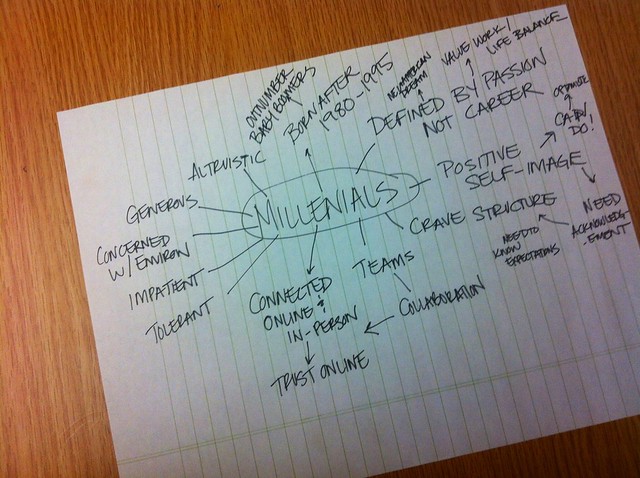
I gave a presentation on Millenials to a small group of graduate students at the Design School on campus. They wanted to know a bit about the characteristics an traits of the Millenial generation. I found that when I was doing research for this topic I used a basic Spiderweb brainstorming tool. (see photo).
I immediately realized that this looked like a Prezi and that having it in a Prezi format would really help my presentation.
All in all I'm happy that I gave Prezi another try, but I still feel that the technology has to to fit your goals for the presentation, not the other way around
BTW: To get a Prezi to embed in Blogger you need to look in your embed code and add an s after your http in ourder for it to embed correctly!
Millenials
I gave a presentation on Millenials to a small group of graduate students at the Design School on campus. They wanted to know a bit about the characteristics an traits of the Millenial generation. I found that when I was doing research for this topic I used a basic Spiderweb brainstorming tool. (see photo).I immediately realized that this looked like a Prezi and that having it in a Prezi format would really help my presentation.
NMC Horizon Report 2013
Every year the New Media Consortium publishes a report on current trends in Higher Education. They look at technological trends at universities across the globe and do a great job of providing an outlook of what to expect in coming years. Every year I present this report to a group of Higher Education graduate students and what technology they can expect to see when they graduate. In the past I have always used Prezi for these presentations because Prezi integrates with YouTube so well. However, this time I actually found a template that fit the idea of forecasting the future of technology, i.e. what is on the Horizon for the next few years.All in all I'm happy that I gave Prezi another try, but I still feel that the technology has to to fit your goals for the presentation, not the other way around
BTW: To get a Prezi to embed in Blogger you need to look in your embed code and add an s after your http in ourder for it to embed correctly!
Friday, September 28, 2012
Digital Footprint
This week I asked my students to think about what their Digital Footprint is about online. They Google Searched themselves and used Skitch to illustrate what they found about themselves. They definitely had different opinions about how much information to post online. So I wanted to post my own search shots.
On my first search of just "Bethany Smith" only or two pages really applied to me.
Once I added "NC" to "Bethany Smith" almost all the webpages applied to me.
When I switched my search to the common username I use "bethanyvsmith" I found that all the web pages applied to me. But these are all things I want to be out there. There are no photos of my family or my personal Facebook use. If someone Googled me, I would be happy with what they found out about me.
On my first search of just "Bethany Smith" only or two pages really applied to me.
Once I added "NC" to "Bethany Smith" almost all the webpages applied to me.
When I switched my search to the common username I use "bethanyvsmith" I found that all the web pages applied to me. But these are all things I want to be out there. There are no photos of my family or my personal Facebook use. If someone Googled me, I would be happy with what they found out about me.
Monday, August 20, 2012
Word Clouds
I started taking word clouds out of my Web 2.0 bag of tricks. They just weren't very educational. Sure they were fun, but what do we actually learn from a word cloud? They are almost too easy. So I started coming across some really great ways to use word clouds in education.
Apparently I have underestimated the humble Word cloud.
- Michael Gorman has 108 uses across the curricular areas
- David Andrade has some great Tagxedo tricks
- Jen Wagner has some great resources on teaching with Wordle.
So this semester I am using Word Clouds as a way to introduce ourselves in my online class. Trying to come up with key words that sum up your personality may be one of my favorite ways of using word clouds, plus it is much more interesting to read as a participant. Every student is asked to create a word cloud and post to the discussion board (see previous post on my love/hate relationship with discussion boards).
Here is my Tagxedo Introduction Word Cloud
This allows me to introduce Word Clouds in a fun way, but also hint at some of the potential later on, without spending a good deal of time on them.
Sometimes just because it's simple, doesn't mean it's easy.
Wednesday, August 15, 2012
My Love/Hate Relationship with Discussion Boards
I love teaching online. I love taking classes online. I love meeting my colleagues and fellow students virtually online. BUT I hate discussion boards! Now not all discussion boards are created equal, but the majority of the discussion board posts I see look like this:
Why this works: Debates are great for getting students to see opposing viewpoints, or find evidence to back-up their own ideals. It creates a more dynamic discussion forum and you will (hopefully) never see the words "I agree"!
So traditional discussion forums are not all bad, and in most cases just need a great guided question, but I'll keep doing it just a bit differently!
There are lots of other ways to use discussion boards - how do you use them?
Read the assigned document for this week. Make one post about what you liked/disliked about this reading by Monday, post a response by Wednesday to another student's initial response.The above to me does nothing but confirm (or try) to the instructor that the student read the article. It does not create community and ends up becoming busy work. So how do we improve discussion board posts? Well, I have a few ideas and suggestions:
Create Debate discussion boards:
In Moodle create a "Choice" activity where students can choose a side. Set-up areas for students on each side to construct their Opening statements (I used Google Docs, but a Wiki could work). Post opening statements to the discussion form, allow for a Q&A period for debate, and then have students work on a closing statement.Why this works: Debates are great for getting students to see opposing viewpoints, or find evidence to back-up their own ideals. It creates a more dynamic discussion forum and you will (hopefully) never see the words "I agree"!
News & Announcements or Q&A forums:
Use forums as a way for students to ask questions about the class. This can be a great place to start an FAQ for the class. If a student asks you a question offline or in e-mail. Ask them to post it in the Q&A forum. Post all your Announcement in its own forum. In Moodle you can require students to subscribe, which will automatically email all of the students in your class. So when the email gets "lost" they can always go to one place to see changes.Peer Review or sharing of student work:
One of the issues I have with online classes is that most work in the class is done between a student and an instructor. Discussion forums are one of the few places in a LMS that will allow for students to post files or links that can be shared with the rest of the class.So traditional discussion forums are not all bad, and in most cases just need a great guided question, but I'll keep doing it just a bit differently!
There are lots of other ways to use discussion boards - how do you use them?
Thursday, April 26, 2012
Poem in Your Pocket
April is National Poetry Month, and in honor of this several events have popped up. There are some great projects you can do with your students and today happens to be Poem in Your Pocket day and in the spirit of this I would like to share with you a poem I found on http://celebratepoetry.tumblr.com/ a Tumblr where you can submit your own work.
Poem submission by E.K.Merrick
That ache for the sound of the rain on a tin roof,
to be held tight during a summer’s storm,
or lie awake in each other’s sweat on a
humid Sydney night.
Familiar voices, horizons like the scars on my hands
and that soothing lick of a language.
That ache to drive north on the Pacific, speeding away from
the harbour and lights. And for an hour,
there’s nothing,
nothing,
but the gums and the great expanse of the Hawkesbury.
And that ache to go back to those small coastal places
that define us more than we want to admit.
These places that we flee from, for fear that their rips
will drag us down and coerce us to stay in the sea,
a life lived as it always has been.
But it’s in these places to fall into the
arms of people loved forever,
despite our ever-shifting and contrasting landscapes.
And it’s these small coastal places that soothes this ache,
And it’s there to return home to, smiling.
Monday, April 23, 2012
EdcampNC 2012 - I survived!
EdcampNC happened over this past weekend, and by some miracle I survived! Seriously, I was worried for awhile. I mean, there is no set schedule ahead of time, no spotlight speakers, no people to organize - I couldn't even set-up the night before due to another event. We would have to do everything THE DAY OF - the control freak in me was losing it! But that is the beauty of an Edcamp - it's easy! Once you have a time and place, it just sort of happens. My concerns over no one showing up, or no one wanting to speak were unfounded. Yes, we had a lower turnout than I would have liked, yes people did leave at lunch, and yes some sessions were not attended, but that happens at every conference. The best part to me was listening in on the conversations being held around our building about how we can be the change we want to see in education, and supporting others on that journey. And in the end that is what an Edcamp is all about, being relevant to teachers and giving them the opportunities to explore new things. All in all I feel it was a success and hope to have many more to come!
Created with flickr slideshow.
Wednesday, April 18, 2012
Music to Work By
I'm always struck by the talk of music that crosses my Twitter stream, not because I don't think we should discuss music, but I love how much new music I discover through social networking. @digitalmaverick had a great tweet about new music yesterday, and @carl_young always has great music recommendations. I was thinking of a post I wrote a few years ago about my "Theme Music" and how I have different playlist for different types of working. Here are a few of my favorite playlists:
Coffee House: In college I did most of my studying at Cup of Joe near campus and wrote most of my Master thesis at coffee houses in the area. There is something about the rhythm of a coffee house, the people, the caffeine that just works well for me. Most of the music in this list is mellow (although I do have a mellow playlist as well to share). This is the music I use when I really need to get some writing done.
Billie Holiday - If you haven't picked up any of her music, get "The Complete Billie Holiday," It is the perfect music to just kind of hang out in the background.
"Question" Old 97s - I love the Old 97s and they will come up a good deal on this list, but their acoustic music is just perfect for writing. My favorite is Question, but the acoustic versions of "Designs on You" or "Valentine" are great as well.
Ryan Adams & The Cardinals - I love the work that Ryan Adams did with the Cardinals, but the album "Jacksonville City Nights" is just one of those I could put on repeat all day.
Garden State Soundtrack - I love sound tracks, but the Garden State soundtrack has to be my favorite. For some mellow tunes, check out "Blue Eyes" by Cary Brothers, "Such Great Heights" by Iron & Wine and "I Just Don't Think I'll Ever Get Over You," by Colin Hay
"Fireflies" - Rhett Miller - the lead singer of the Old 97s, Rhett Miller has done some fantastic solo work. This duet with Rachel Yamagata has to be one of his best
"In the Sun" by Joseph Arthur. This song has been covered by a multitude of people, but the original is still the best.
"White Blank Page" - Mumford and Sons. This may not be an entirely mellow song, but when writing you can definitely feel the writers block Marcus feels when singing about a white blank page and a swelling rage.
Music to get you Psyched up: This harkens back to my Theme music post, but this is the music that gets me going when I need it the most.
"Rolling In the Deep" by Adele - Is there anyone left that doesn't like Adele? "Set Fire to the Rain" is also up there as a song that makes me want to sing very badly at the top of my lungs
"Dog Days are Over" by Florence + The Machine - great for getting you moving
"Four Leaf Clover" "Timebomb" "Doreen" - Old 97s If this music doesn't get you toe tapping there is no hope for you! Check out their "Alive & Wired" album. They are one of the best bands to ever see live.
"Little Lion Man" - Mumford and Sons, The album "Sign No More" is simply fantastic. Go buy it now. Seriously.
"Talk on Indolence""Kick Drum Heart" "Slight Figure of Speech" - The Avett Brothers. A local band that "did good" The Avett Brothers are a great blend of rock and roll and bluegrassy tones of the south. These songs are great for getting the blood pumping and yelling. These guys are great live as well.
I'm not even close to the end of my list, but I thought I would share a few of my favorites and to post more along the way? Any music you recommend I start listening to?
Coffee House: In college I did most of my studying at Cup of Joe near campus and wrote most of my Master thesis at coffee houses in the area. There is something about the rhythm of a coffee house, the people, the caffeine that just works well for me. Most of the music in this list is mellow (although I do have a mellow playlist as well to share). This is the music I use when I really need to get some writing done.
Billie Holiday - If you haven't picked up any of her music, get "The Complete Billie Holiday," It is the perfect music to just kind of hang out in the background.
"Question" Old 97s - I love the Old 97s and they will come up a good deal on this list, but their acoustic music is just perfect for writing. My favorite is Question, but the acoustic versions of "Designs on You" or "Valentine" are great as well.
Ryan Adams & The Cardinals - I love the work that Ryan Adams did with the Cardinals, but the album "Jacksonville City Nights" is just one of those I could put on repeat all day.
Garden State Soundtrack - I love sound tracks, but the Garden State soundtrack has to be my favorite. For some mellow tunes, check out "Blue Eyes" by Cary Brothers, "Such Great Heights" by Iron & Wine and "I Just Don't Think I'll Ever Get Over You," by Colin Hay
"Fireflies" - Rhett Miller - the lead singer of the Old 97s, Rhett Miller has done some fantastic solo work. This duet with Rachel Yamagata has to be one of his best
"In the Sun" by Joseph Arthur. This song has been covered by a multitude of people, but the original is still the best.
"White Blank Page" - Mumford and Sons. This may not be an entirely mellow song, but when writing you can definitely feel the writers block Marcus feels when singing about a white blank page and a swelling rage.
Music to get you Psyched up: This harkens back to my Theme music post, but this is the music that gets me going when I need it the most.
"Rolling In the Deep" by Adele - Is there anyone left that doesn't like Adele? "Set Fire to the Rain" is also up there as a song that makes me want to sing very badly at the top of my lungs
"Dog Days are Over" by Florence + The Machine - great for getting you moving
"Four Leaf Clover" "Timebomb" "Doreen" - Old 97s If this music doesn't get you toe tapping there is no hope for you! Check out their "Alive & Wired" album. They are one of the best bands to ever see live.
"Little Lion Man" - Mumford and Sons, The album "Sign No More" is simply fantastic. Go buy it now. Seriously.
"Talk on Indolence""Kick Drum Heart" "Slight Figure of Speech" - The Avett Brothers. A local band that "did good" The Avett Brothers are a great blend of rock and roll and bluegrassy tones of the south. These songs are great for getting the blood pumping and yelling. These guys are great live as well.
I'm not even close to the end of my list, but I thought I would share a few of my favorites and to post more along the way? Any music you recommend I start listening to?
Tuesday, April 17, 2012
Remembering Chris
It has been almost a year since the world lost Chris Hondros. I've been thinking about him a good deal lately. Two weeks ago Artspace in downtown Raleigh opened an exhibition, Chris Hondros
A Retrospective, and my friends and I got a chance to celebrate what Chris had given us all - amazing photographs depicting the reality of war. So, I wasn't surprised to hear late last night that Chris had been nominated for a Pulitzer (his second time being nominated), for his work on the Arab Spring, his last and final assignment. I got to see these pictures up close and they were truly breathtaking. They are not for the faint of heart, but I encourage you to peruse these images and share them with your students.
Year End Report
It's that time of year again where year end reviews are coming up. In my world, I don't have to do a fancy report like faculty do (thank goodness), but I do need to highlight what I have accomplished over the past year. It's funny to see a year of your life in a list and to think about how your job has changed over the years. One of the things I'm most proud of is that I worked with over 20 courses this past Fall & Spring. And those are just the classes I was a guest speaker in and it doesn't count all the faculty I worked with. Now, 20 courses may not sound like a lot, but it is such a huge shift in my position. I really wanted my job to be more than workshops and support. I love teaching and working with faculty, but I wanted to be more hands-on. Now I get to work with faculty on integrating technology in their specific course, not just as a general idea. I get to work with their students, and get to know them.
Now my "biggest" accomplishment this past year may be that we migrated our website to Drupal and I got to geek out on that, but what I'm the most proud of are the differences I've made in the classroom, and I hope they keep inviting me back.
Thursday, April 12, 2012
Creating a better Poster Presentation
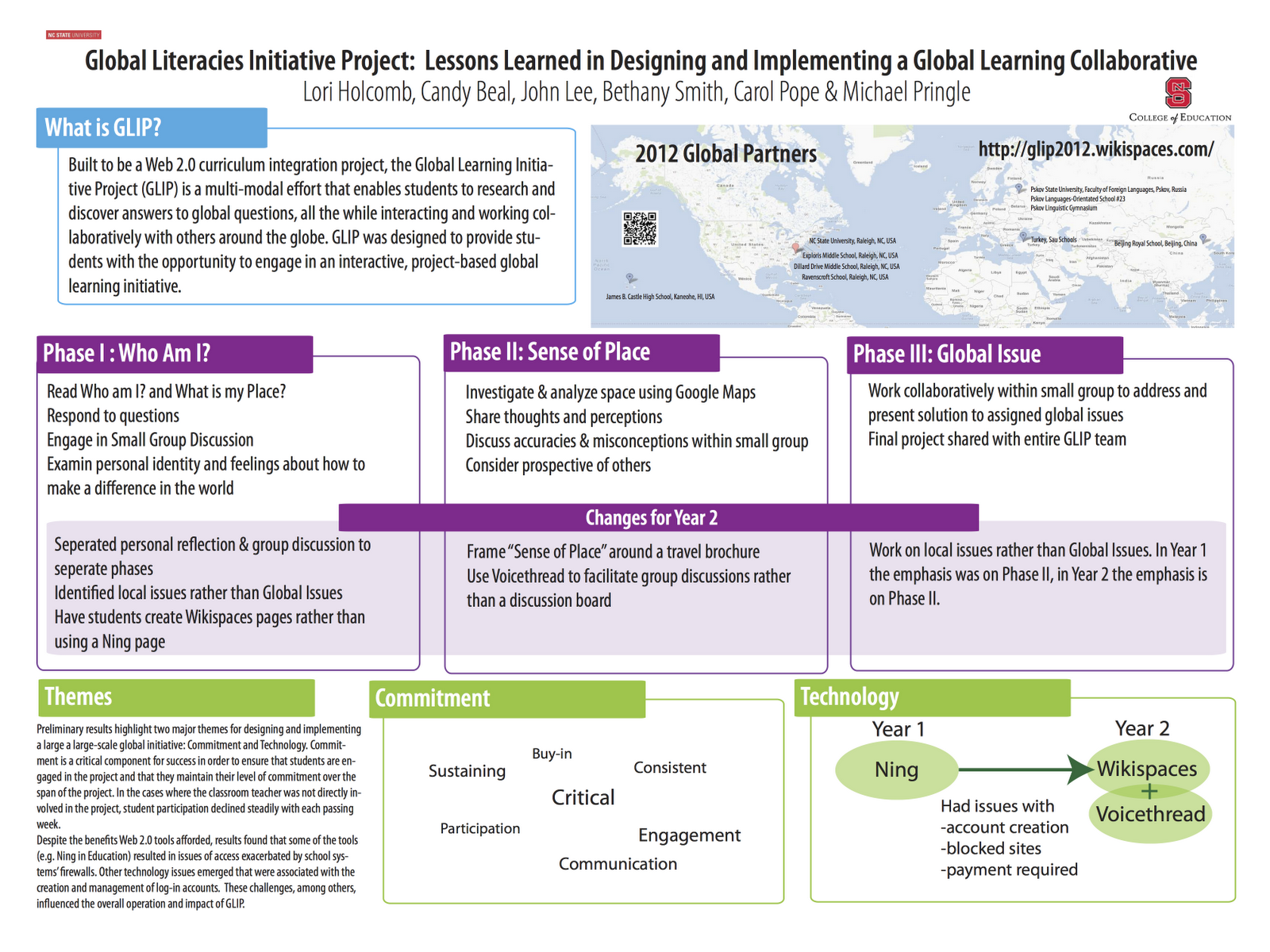
I've blogged before about poster presentations, but recently I came across this post by Colin Purrington and thought it might be worthwhile to discuss again. I recently attended the SITE conference in Austin, TX and had a poster accepted surrounding our GLIP project (more on that later). I found the posters at SITE, as I do at most conferences, range from professionally graphic designed and glossy to printed out 8.5x11s of a Power Point presentation. Now, a lot of times poster sessions are considered on the low end of the totem pole, if you don't get accepted as a session you can always put in a poster. But I find that poster sessions are great times to really talk to colleagues about the work they are doing. However, a badly designed poster, or worse just a series of Power Point slides can really hurt your chances of getting any interaction with people.
Designing a Poster
I design all of my posters in either Adobe InDesign or Illustrator. Now I used to teach Adobe InDesign and do layout work, so I'm comfortable in it. However, if you bought the Adobe Suite and are only using Photoshop, I HIGHLY recommend you start playing with this software. I use it for all of my posters, both large and small as well as my handouts. What most people will use to design their poster is PowerPoint. The key to using PP is to make your slide be as large a you will be printing your poster. In other words, if you have a plotter, see what the width of the printable area is, that should be the height of your poster. This is important because some people will design a slide at regular size and just "blow it up" to poster size. This produces grainy and pixelated disatsers.
Now that you have your poster size figured out. Imagine that your poster is separated into quadrants or columns. I personally like a 3 column approach, but that doesn't always fit. I like to use color and outlines to separate areas without "trapping white space." Speaking of white space, don't go over board with a large graphic in the background of your poster or use a black background with white text. All you will end up doing is wasting ink and making it harder to read. Use your images or diagrams to denote where the quadrants are in your poster. These should be prominent and have meaning.
Your text should be easily read from about 10 feet away from your poster. The idea of the poster is to be a representation of your ideas, not a copy and paste from an article you wrote. Remember - YOU will be there to explain the poster. Have your 5 minute elevator speech rehearsed and ready. However, some people are going to want more information. Instead of having a handout, I prefer to create a website (or use the project website you already have) and insert a QR code on your poster. This makes it easy for people to find your extended paper, as well as remember you later.
Colin has a great list of Do's and Don'ts at the bottom of his post that I highly recommend, especially when it comes to effective diagrams. But the most important thing about poster design is that it really shouldn't be left to the last minute. Start planing and designing early - Colin even recommend posting an image to Flickr to get feedback, a good poster always makes a good impression!
![]() |
| SITE 2012 Poster for GLIP Project |
I design all of my posters in either Adobe InDesign or Illustrator. Now I used to teach Adobe InDesign and do layout work, so I'm comfortable in it. However, if you bought the Adobe Suite and are only using Photoshop, I HIGHLY recommend you start playing with this software. I use it for all of my posters, both large and small as well as my handouts. What most people will use to design their poster is PowerPoint. The key to using PP is to make your slide be as large a you will be printing your poster. In other words, if you have a plotter, see what the width of the printable area is, that should be the height of your poster. This is important because some people will design a slide at regular size and just "blow it up" to poster size. This produces grainy and pixelated disatsers.
Now that you have your poster size figured out. Imagine that your poster is separated into quadrants or columns. I personally like a 3 column approach, but that doesn't always fit. I like to use color and outlines to separate areas without "trapping white space." Speaking of white space, don't go over board with a large graphic in the background of your poster or use a black background with white text. All you will end up doing is wasting ink and making it harder to read. Use your images or diagrams to denote where the quadrants are in your poster. These should be prominent and have meaning.
Your text should be easily read from about 10 feet away from your poster. The idea of the poster is to be a representation of your ideas, not a copy and paste from an article you wrote. Remember - YOU will be there to explain the poster. Have your 5 minute elevator speech rehearsed and ready. However, some people are going to want more information. Instead of having a handout, I prefer to create a website (or use the project website you already have) and insert a QR code on your poster. This makes it easy for people to find your extended paper, as well as remember you later.
Colin has a great list of Do's and Don'ts at the bottom of his post that I highly recommend, especially when it comes to effective diagrams. But the most important thing about poster design is that it really shouldn't be left to the last minute. Start planing and designing early - Colin even recommend posting an image to Flickr to get feedback, a good poster always makes a good impression!
Monday, April 2, 2012
Creating Lifelong Learners
One of the great aspects of my job and one I highly appreciate is that I get to be part of the process of our Accreditation team. Yes, you heard that correctly, our Accreditation Team (which we call SWAT) is a group that was formed under much duress during an Accreditation year and has grown into what I feel is the heart of our College of Education (but I'm biased). Our group with many others are constantly looking at how we can improve our college and our programs. We have had several years of re-visioning our programs at the State and University Level, but one thing we keep coming back to is do our students have the "Dispositions" to be teachers. Now, dispositions could be wide open for interpretation, but our Lead & Serve Conceptual Framework, specifically the SERVE section focus on the dispositions we want to see in our students and future teachers. Although all of them are important, three of them are central to my post today; Scholarly, Reflective, & Experienced in practical applications of knowledge. You see I want our students to know they don't know everything, to constantly be looking to improve themselves and their teaching practices, and to take the time to reflect on what they do know and their process of acquiring knowledge. Now you may say - that is what a teacher preparation program is for! But we can tell them this is important when they graduate, but sometimes you just need to experience it for yourself.
So how do you get your Pre-Service Teachers to think of going to Professional Development opportunities once they graduate? How do we get them to be self-directed in their learning? How doe we encourage Life Long Learning? You create PD modules, workshops, sessions for them to attend BEFORE they graduate. Give them an opportunity to take charge of what, when and how they want to learn.
So we have started offering PD sessions to our undergraduate students. We are not tying them to grades or to classes - we are tying them to licensure. So just like you have to have so many CEUs once you are a teacher, now you need to have so many PD Units to get a teaching license. We have started offering sessions and want to see them grow as well as have students find their own opportunities for learning. I've held sessions this semester and last Fall, attendance was low, but we had an amazing time. It was the perfect combination of students that wanted to learn and subject matter that could be customized to their needs. I have high hopes for next Fall!
So what do you think? Will it work? What do we have to be careful of?
So how do you get your Pre-Service Teachers to think of going to Professional Development opportunities once they graduate? How do we get them to be self-directed in their learning? How doe we encourage Life Long Learning? You create PD modules, workshops, sessions for them to attend BEFORE they graduate. Give them an opportunity to take charge of what, when and how they want to learn.
So we have started offering PD sessions to our undergraduate students. We are not tying them to grades or to classes - we are tying them to licensure. So just like you have to have so many CEUs once you are a teacher, now you need to have so many PD Units to get a teaching license. We have started offering sessions and want to see them grow as well as have students find their own opportunities for learning. I've held sessions this semester and last Fall, attendance was low, but we had an amazing time. It was the perfect combination of students that wanted to learn and subject matter that could be customized to their needs. I have high hopes for next Fall!
So what do you think? Will it work? What do we have to be careful of?
Thursday, March 29, 2012
Netiquette
One of the things I love about my job is the flexibility to work with the local school system. Since we are a Land-grant University, it is also expected and I try to work with local schools as much as I can. This past weekend I was invited to speak at a local 21st Century Skills conference. I was one of the few that wasn't a classroom teacher (to which I say - Awesome! - I hope to teach myself out of a job, but I digress) In any event, I was asked to present on the over arching topic of Netiquette. I present on Cybersafety, Digital Citizenship, and Digital Footprints fairly often, which all touch on parts of Netiquette, but never just on Netiquette itself. It seemed like something so basic, but then I thought of why someone would want to attend a session on Netiquette, maybe they were about to start their first online collaborative project and need guidance. What would they need guidance on? Well, how do you set a precedent for good manners online, how do you come up with guidelines for online behavior, and then how do you assess this behavior.
I structured my session around the book Netiquette, which by the way came out in 1994! And use the 10 major tenants of the book to structure our conversation:
Rule 1: Remember the Human
Rule 2: Adhere to the same standards of behavior online that you follow in real life
Rule 3: Know where you are in cyberspace
Rule 4: Respect other people's time and bandwidth
Rule 5: Make yourself look good online
Rule 6: Share expert knowledge
Rule 7: Help keep flame wars under control
Rule 8: Respect other people's privacy
Rule 9: Don't abuse your power
Rule 10: Be forgiving of other people's mistakes
I structured my session around the book Netiquette, which by the way came out in 1994! And use the 10 major tenants of the book to structure our conversation:
Rule 1: Remember the Human
Rule 2: Adhere to the same standards of behavior online that you follow in real life
Rule 3: Know where you are in cyberspace
Rule 4: Respect other people's time and bandwidth
Rule 5: Make yourself look good online
Rule 6: Share expert knowledge
Rule 7: Help keep flame wars under control
Rule 8: Respect other people's privacy
Rule 9: Don't abuse your power
Rule 10: Be forgiving of other people's mistakes
At the heart of all of Netiquette is Rule #1 - Remember the human. It is so easy to hide behind a keyboard and almost all of the issues we run into online can come back to violating that rule. I structured the workshop on two small group sessions, the first of which I asked them to use Google Docs to have them come up for the rules of their classroom online. I encouraged them to create a "Social Contract" with their students that the class would agree upon before entering an online environment. They cam up with great ideas such as:
- Think before you post.
- Be respectful of yourself and others.
- Don't bother projects done by other people
- Don't copy and paste stuff that doesn't belong to you.
- Respect stays the same whether your online or in person.
- Don't just lurk but participate.
We didn't get to touch too much on commenting, but I find that when in an online project and you are soliciting feedback from your students you tend to get really bad comments. Not inappropriate comments, but comments that are just "I agree" or "Good Job." I pulled some comment starters from Bill Ferriter's website on Voicethread - and even though they are in the Voicethread context, they really fit all types of commenting structures. I highly recommend checking it out.
All in all I felt it was a good session. I really thought I would run out of material and had some back-up information on Cyberbullying and Digital Citizenship in my back pocket to pull out if I needed to. I have all the links used in my session at:
Tuesday, March 27, 2012
EdcampNC April 21st!
One of the things that I have always loved about going to ISTE is the Edubloggercon "unconference" that happens the Saturday before the formal conference. It is a great time to meet people, exchange ideas, and in general have engaging discussions about what is happening in education. The Edcamp model embodies this and in essence takes the unconference model and makes it a stand alone event. Based on the Barcamp model, which has roots in IT it is only fitting that the Edcamp model would be born. What I love about the Edcamp model, and their evangelists, Kristen Swanson and Dan Callahan (among others) is that they really want to see this replicated across the county and even the world. That by taking ownership of their Professional Development teachers will get more out of it - isn't that what we try to get our students to do!?!So last year I made a half-hearted attempt to run an Edcamp - which essentially meant it didn't happen. But this year I was determined, and I had time and people to invest. I wanted EdcampNC to be more than just a PD opportunity for teachers, I wanted to include the University community as well. I want our Pre-service teachers to see what life long learning really means, to share what they know and be respected as experts. I want the faculty in both the College of Education and others to see the innovative practices happening in the K-12 classrooms as well as share their own practices. We ALL have an opportunity to learn from one another and I'm excited to be a part of it.
So on Saturday April 21st, I hope to see you at Poe Hall on the campus of NC State University for the 1st Annual EdcampNC - trust me, you won't want to miss it!
Register for EdcampNC Now!
Thursday, March 22, 2012
Back to Blogging
| Flickr Betchaboy |
Thursday, July 14, 2011
QR Code Scavenger Hunt
![]() |
| Student scanning a QR Code |
- Introduce them to people in the college
- Introduce them to the facilities available to them in the college
- Introduce them to the ideals and mission of the college
So where does the "scavenger hunt" part come in? Well we gave a clue at the end of each video about what their task would be. Since they all would be using iPod Touch devices from the Media Center, we knew they would have the ability to take reqular pictures as well. So each task included them taking a picture of a particular obvject. The first group to get back to the main auditorium, with all the correct pictures would win our scavenger hunt.
I was amazed at how well it went over. Students were running around the building, getting to know their group members and seeing parts of our building (like the media center) that they may never have discovered. Now I know that some students cheated and fast forwarded to the end of the video, and were only in it to win. But I feel that we would have lost them in a long lecture anyways.
In the end it was a resounding success, and really only possible with technology. I am so thankful that the NSO group was open to try something like this and I think we might keep the QR Codes up so that our students can find out more information about the college!
Subscribe to:
Posts (Atom)